


igloohome
4.267.00 Reviews
App Specs
- Version
- 3.4.0
- Updated On
- License
- Free
- Downloads
- 100,000+
- Developer
- Igloohome
- Categories
- House & Home
- Platform
- Android
Screenshots
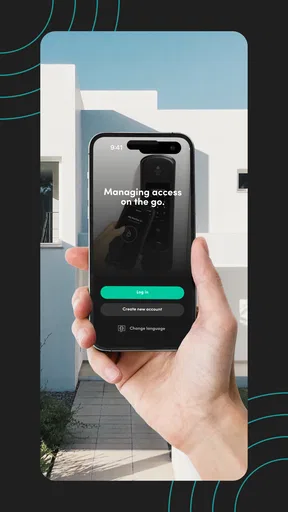
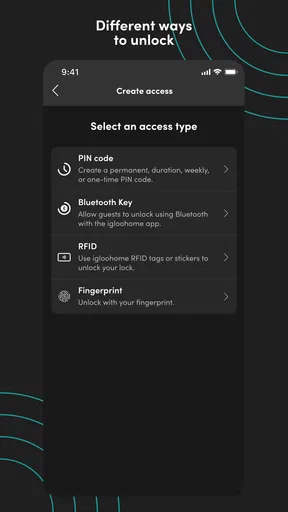
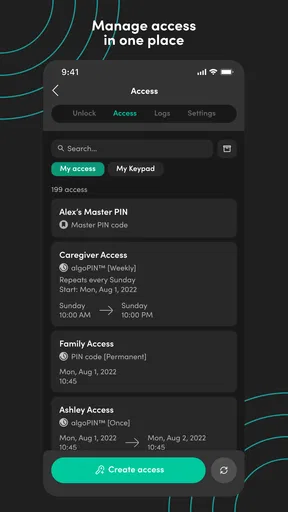
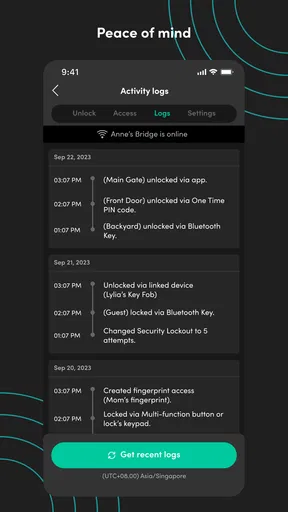
 Analysis by AppCompare
I found igloohome most interesting when I stopped thinking of it as a simple door-unlocking tool and looked at it as an access-management app for everyday situations. Developed by Igloohome, it connects the idea of a smart lock with the practical problem of deciding who should enter, when they should enter, and how much effort that process should require. It is free, aimed at Everyone, and belongs in the House & Home category, but its usefulness depends heavily on the lock hardware and the way a household shares access.
My overall impression is positive, with an important qualification: this is not an app that makes every access problem disappear. It can reduce key handoffs and make shared entry more manageable, yet it also introduces a digital layer that some people may find harder than a physical key. I paid particular attention to readability, navigation, different motor and sensory needs, and the moments when someone needs to get through a door quickly or without help.
How the app feels to use day to day
I find the day-to-day experience easiest to judge by looking beyond the screen: the useful question is whether each person can complete the whole entry routine comfortably, from identifying the right door to operating the lock. Before relying on it for a regular visitor, I’d rehearse that sequence together once and agree on a simple fallback, so an unfamiliar step doesn’t become a problem at the doorstep.
Readability and navigation are strongest when the task is simple
The clearest part of the experience is the basic purpose. You open the app because you need to manage smart-lock access, not browse a large collection of unrelated tools. That focused role helps the main workflow feel more understandable than many broader smart-home apps, where door controls can be buried among lights, cameras, thermostats, and automation routines.
For a first-time user, the important mental model is straightforward: the app is the control point, while the lock remains the physical object that determines whether entry can happen. That distinction matters. A person may understand the screen perfectly and still need to position a phone correctly, use a keypad or lock mechanism, or follow the access method associated with the particular installation.
I would describe the navigation as practical rather than luxurious. It is designed around managing access, so the experience makes more sense when you already know which door or lock you are dealing with. If several family members share responsibility, agreeing on simple names for doors and a consistent routine can prevent confusion. This is a small organizational tip, but it makes a noticeable difference when someone is tired, carrying groceries, or trying to help a visitor remotely.
The current version is 3.4.0, and the app supports Android devices running version 7.0 or later. That gives it a relatively broad reach for people who keep an older phone in service, although the quality of the experience will still depend on the device’s screen, operating system behavior, and the compatible lock setup. I would not judge accessibility from the version number alone; the real test is whether the person can comfortably identify the correct control and complete the physical part of entry.
Worth Reading Before You Choose

EA SPORTS FC Mobile 26 Is a Bigger Football Game, but It Takes Time

Flipboard Shows What News Apps Must Do Beyond the Feed

Switching to Android Auto Means Rethinking Your Driving Routine

Google Calendar Makes a Crowded Week Easier to Manage

Ludo King Makes the Most of the Minutes Between Plans

Baby Panda World Brings Quick Play to Modern Phones, but Its Game Library Feels Busy
Text size and contrast are especially important here because access tasks are often performed in poor lighting. A user might be standing outside at night, looking at a phone through glare, or trying to read while holding bags. I found that a clean, focused interface helps, but anyone with low vision should test the app on their own device rather than assume that a smart-lock interface will be equally comfortable for everyone.
Motor and sensory needs affect the whole access chain
One of the less obvious lessons from using a smart-lock app is that accessibility does not stop at the screen. The user may need to unlock the phone, open the app, select the right access option, hold the device in a particular place, enter information, or operate the lock itself. Someone with limited hand movement may find the phone controls manageable but the final door action difficult. Another person may have no trouble turning a handle but struggle to read small on-screen instructions.
For that reason, I would evaluate igloohome as a complete workflow rather than as an isolated app. Before relying on it as the only way into a home, I would ask: can the user unlock their phone independently, recognize the correct lock, perform the required interaction, and open the door without rushing? If one answer is no, another household member may need to help, or a different access arrangement may be safer.
People with hearing-related needs may also appreciate that the core task is visual rather than dependent on hearing a spoken instruction. At the same time, visual dependence can create its own barrier for blind or low-vision users. I would not promise that the app works equally well with every screen reader or assistive setting, because that can vary by operating system and interface implementation. Anyone who relies on such tools should test the exact access journey before distributing the app as a required solution.
For users with tremors or reduced dexterity, a useful preparation step is to avoid making the first attempt happen during an urgent arrival. Set up the person’s access in a calm environment, then practice the process at the actual door. That reveals whether the difficult part is the app, the phone, the lock position, the lighting, or the door hardware. It also helps identify whether a physical key or another backup should remain available.
People with cognitive disabilities may benefit from a predictable routine. Keeping one clearly labeled lock entry, using the same sequence each time, and avoiding last-minute changes can make the app less demanding. If access is being shared with a caregiver, I would explain the process in plain language and rehearse it once rather than assuming that an invitation or code automatically makes the system easy to use.
Situational access is where the app earns its place
The strongest use case is controlled entry for people who do not all live together. Imagine a relative arriving to check on an older family member, a cleaner visiting at an agreed time, or a guest reaching a rental property while the owner is elsewhere. In those situations, the app can be more convenient than hiding a spare key, arranging a physical handoff, or asking someone to travel across town just to open the door.
I especially like the idea of treating access as a planned responsibility rather than an emergency favor. A household can decide who needs entry, explain the process in advance, and make sure the recipient’s phone and abilities match the lock’s requirements. That is more inclusive than simply sending an instruction and expecting every visitor to solve the rest alone.
There is also a useful distinction between convenience and independence. A person may technically have digital access but still depend on another person to operate the door, interpret the app, or troubleshoot a failed attempt. The app can support independence when the entire setup is appropriate, but it should not be described as automatically accessible merely because it removes a metal key.
For a busy household, the practical gain is less about pressing a button and more about reducing coordination. If a family member is delayed, a visitor can potentially use the access arrangement already prepared for them instead of waiting outside. That can be valuable for people with fatigue, anxiety, mobility limitations, or unpredictable schedules, because fewer face-to-face handoffs mean fewer moments where timing becomes a barrier.
Still, I would prepare visitors carefully. Tell them which door to use, what they should do if the app does not behave as expected, and whom to contact. Avoid assuming that a guest will understand smart-lock terminology. A short, calm explanation is more useful than sending a complicated message at the moment they arrive.
It compares well with keys, but not with every alternative
Compared with a traditional key, igloohome offers a more flexible way to organize shared access. A key can be copied, lost, forgotten, or left under a mat. It also gives little visibility into who has been trusted with entry unless the household keeps its own records. A smart-lock arrangement can make access easier to coordinate, particularly when people live apart.
Compared with a basic keypad, the app adds a phone-based management layer. That may be helpful for an owner who wants to handle access without visiting the property, but it also means another device is involved. A keypad can be easier for a person who prefers entering a code and does not want to navigate a phone. On the other hand, a phone app may be more suitable for someone who already manages daily tasks digitally and wants fewer separate codes to remember.
Compared with a general smart-home platform, the focused nature of this app is a strength. I would rather use a tool built around access management than search through unrelated home controls when the immediate need is the door. The trade-off is that people who want one central app for every smart device may prefer a broader ecosystem, even if its lock controls are less focused.
The right choice therefore depends on the person, not just the property. For a household comfortable with phones and shared digital routines, this app can be a sensible bridge between physical security and remote coordination. For someone who wants the fewest possible steps, a well-designed physical key or keypad may still be better.
Where the experience can become difficult
The biggest barrier is dependency. A phone battery, a locked device, an unfamiliar interface, or a poor connection between the user and the physical lock can interrupt the experience. Even when the app itself is clear, access happens in the real world, where rain, darkness, gloves, limited balance, and a heavy bag can turn a small interaction into a frustrating one.
I would also be cautious about making the app the sole plan for a person who may need urgent or independent entry. A backup arrangement is sensible, especially for older adults, people with memory difficulties, and anyone whose phone use is inconsistent. That backup does not undermine the value of the app; it recognizes that digital access should be convenient without becoming a single point of failure.
Another limitation is the learning curve for recipients. The owner may understand the system quickly, while a guest or caregiver sees it only once every few weeks. Infrequent users are more likely to forget the sequence, use the wrong door, or feel uncomfortable asking for help. A printed instruction kept in a safe place, written in large clear text, can make the arrangement more forgiving, provided it does not expose sensitive access information.
There is also a social barrier that technical reviews often miss. Some people dislike being given access through an app because it feels less tangible than receiving a key. Others may not own a suitable smartphone or may avoid installing new applications. In those cases, insisting on the digital method can exclude the very person the system is meant to help.
Privacy and trust deserve practical attention too. Access management is not only about whether the door opens; it is about who is authorized and how responsibly that authorization is handled. I would limit access to people who genuinely need it, remove old permissions when circumstances change, and avoid sharing one person’s phone or account casually. These are household habits rather than claims about a particular feature, but they are essential to using any digital entry system sensibly.
Who should use it, and who should look elsewhere?
I think igloohome is a good fit for households that already have compatible smart-lock hardware and regularly coordinate entry among family members, guests, caregivers, or service providers. It is also worth considering for people who dislike spare keys and want a more organized way to manage access. The app is free, so the initial software barrier is low, although the overall experience naturally depends on the lock arrangement already in place.
I would be more hesitant to recommend it to someone who wants a completely offline, no-phone routine. It is also not my first choice for a user who cannot reliably operate a smartphone and has no trusted person available to help. In that situation, a physical key, an accessible keypad, or a professionally planned entry system may be more appropriate.
Families should decide in advance who will administer access. If everyone can change settings without a clear plan, confusion may replace the convenience the app was meant to provide. One responsible person, plus a backup administrator who understands the routine, is a more manageable arrangement than leaving decisions scattered across the household.
For caregivers, I would recommend a trial period before depending on the system. Have the caregiver arrive at a normal time, complete the process without coaching, and try it under the conditions that matter: carrying supplies, using the phone with one hand, or arriving after dark. This reveals practical barriers that a desk-based test will miss.
A balanced verdict on inclusive everyday access
After using it as a House & Home tool rather than treating it as a novelty, I see igloohome as a useful access coordinator with real inclusive potential. Its focused purpose can reduce key exchanges and make planned entry easier for people who live apart. The app has reached over one hundred thousand installs and holds a 4.2 average from around seven hundred ratings, which suggests that it has found a meaningful audience without turning those figures into a guarantee for every user.
My recommendation comes with a simple condition: test the entire journey with the actual person who will use it. Check the text and controls on their phone, the physical lock action at the door, the lighting, the need for one-handed use, and the backup plan. A system that feels effortless to one household member may be tiring or confusing for another.
Igloohome, from Igloohome, is at its best when it replaces awkward coordination with a clear, rehearsed routine. It is less convincing when it is presented as a universal substitute for keys or as an accessibility solution by itself. I would recommend it to digitally comfortable households with compatible hardware, while keeping a practical alternative for anyone who cannot depend on a phone. Used with that honesty, it can make shared access calmer, more flexible, and more respectful of different abilities and daily circumstances.
Pros
- Works with selected smart locks
- keyboxes
- and padlocks.
- Time-sensitive PINs can grant access without sharing physical keys.
- Useful for rentals
- property management
- and remote guest access.
- Access activity can help owners monitor when codes are used.
- Bluetooth operation can work even when the lock has no Wi-Fi connection.
Cons
- Compatibility is limited to igloohome-enabled hardware.
- Most features require purchasing a separate smart lock or keybox.
- Bluetooth range may restrict management when you are far from the device.
- Battery level and maintenance still depend on the physical lock.
- Some advanced sharing and management tools may require an account.
FAQs for igloohome
What is igloohome, and what can I use it for?
igloohome is a smart access app designed to work with compatible igloohome locks, keyboxes, and padlocks. After pairing a supported device, you can lock or unlock it, create PIN codes or Bluetooth keys, manage access for guests, and review activity logs. It is useful for homes, rentals, offices, storage areas, and other places where controlled keyless entry is needed.
Does igloohome require Wi-Fi or a constant internet connection?
Not always. One of igloohome’s useful features is that many access codes can be generated and used without the lock being continuously connected to Wi-Fi. Bluetooth is generally used when operating a compatible device nearby, while internet access is needed for account functions, remote management on supported products, synchronization, and sharing access. Exact requirements depend on the specific igloohome model.
How do I give another person access through igloohome?
The app allows you to share access in several ways, depending on the connected lock or keybox. You may create a temporary or recurring PIN code, send a Bluetooth key, or invite another user through the app. Before sharing, check the validity period and permissions carefully. Recipients may need the igloohome app, Bluetooth enabled, and a compatible smartphone for certain access methods.
Is igloohome secure enough for homes, rentals, and business use?
igloohome includes practical security features such as time-limited PINs, scheduled access, Bluetooth-based unlocking, user management, and activity records on supported devices. These tools can be safer and more convenient than copying physical keys, but security also depends on choosing a strong account password, protecting your phone, updating the app, and selecting a lock appropriate for the location and level of risk.
What should I check before buying an igloohome lock or downloading the app?
Before getting started, confirm that your phone meets the app’s Android or iOS requirements and that the chosen igloohome product is compatible with your intended door, gate, cabinet, or storage area. Review battery life, installation measurements, weather resistance, access methods, and whether remote features require an additional hub or gateway. Also verify regional availability and the manufacturer’s support options.


